Best 4K Webcams 2026: Top Picks for Streaming & Video Calls
Table of Contents
Quick Comparison Table
| Model | Price | Max Resolution | Frame Rate | Special Feature | Best For |
|---|---|---|---|---|---|
| Logitech MX Brio 4K | $169 | 4K (2160p) | 30 fps | AI enhancement, Show Mode | Overall best |
| OBSBOT Tiny 2 Lite | $149 | 1080p | 60 fps | AI auto-tracking, gesture control | Content creators |
| EMEET S600 4K | $89 | 4K (2160p) | 30 fps | Sony sensor, PDAF autofocus | Budget 4K option |
| Elgato Facecam Pro | $249 | 4K (2160p) | 60 fps | Uncompressed 4K, studio-grade | Professional streamers |
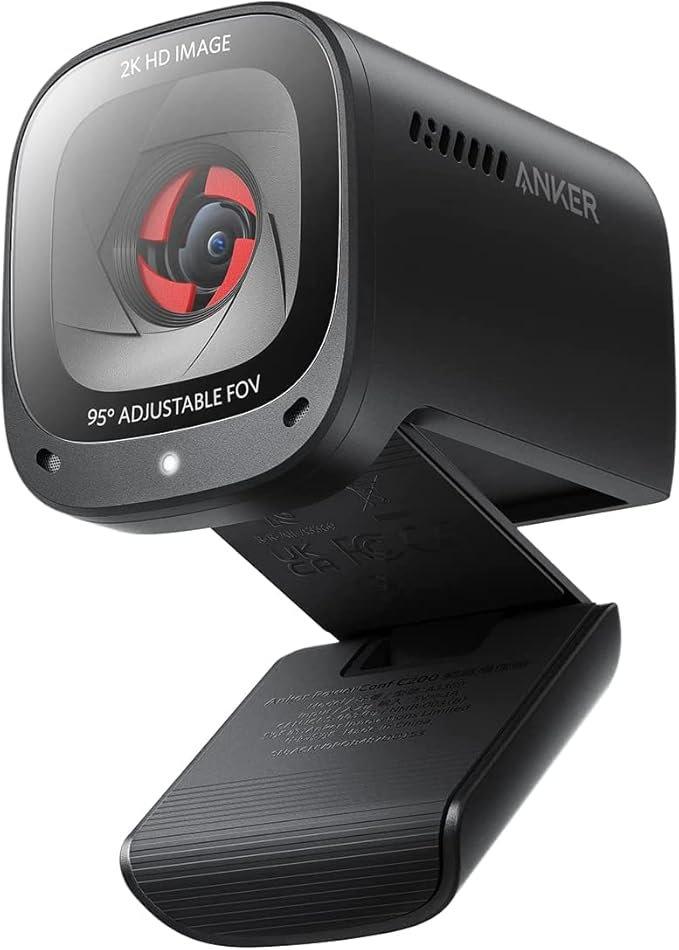
| Anker PowerConf C200 | $59 | 2K (1440p) | 30 fps | AI noise cancellation, privacy shutter | Budget-conscious |
1. Logitech MX Brio 4K – Best Overall 4K Webcam
Best Overall
The Logitech MX Brio 4K stands as the gold standard for everyday 4K webcam users. Capturing stunning 4K video at 30fps or 1080p at 60fps, this versatile performer excels in both professional video calls and creative streaming. The standout feature is Logitech’s proprietary Show Mode—a unique technology that intelligently balances your face and screen content, perfect for product demonstrations or presentation-heavy meetings.
The built-in AI enhancement automatically adjusts lighting and smooths your appearance, which is especially valuable during early morning calls or video recordings in suboptimal lighting conditions. The camera’s 90-degree field of view provides excellent framing without requiring much desk real estate. USB-C connectivity with power delivery streamlines your setup, while the included privacy shutter gives peace of mind when you’re not actively streaming.
Standout Features: Show Mode technology, AI enhancement, 4K30/1080p60 dual recording, sleek design, privacy shutter, and excellent build quality that justifies the mid-range price point.
Pros
- Exceptional image quality with true 4K at 30fps
- Unique Show Mode for balanced presenter and content display
- Smart AI enhancement for flattering video in any lighting
- USB-C with power delivery simplifies cable management
- Privacy shutter for security-conscious users
- Works seamlessly with all major platforms (Zoom, Teams, OBS)
Cons
- Limited to 30fps in 4K mode (not ideal for fast-paced gaming)
- Premium pricing compared to basic 1080p alternatives
- Requires more bandwidth for 4K streaming
- May need additional lighting setup despite AI enhancement

2. OBSBOT Tiny 2 Lite – Best AI Tracking & Auto-Follow
Best AI Tracking
The OBSBOT Tiny 2 Lite revolutionizes the webcam experience through advanced AI-powered auto-tracking technology. This camera automatically follows your movements throughout your space, keeping you perfectly framed regardless of whether you’re sitting at your desk or walking around your room. This innovative feature is a game-changer for content creators, podcasters, and educators who need hands-free camera control.
Beyond auto-tracking, the Tiny 2 Lite includes gesture recognition capabilities—simple hand gestures can trigger recording starts, pause streams, or switch scenes without touching your keyboard. The compact design makes it ideal for minimalist setups or travel. While it tops out at 1080p60 rather than 4K, the AI-driven composition and consistent framing often make footage appear more polished than static 4K alternatives.
Standout Features: AI auto-tracking, gesture control, compact form factor, 1080p60 recording, real-time emotion detection, and intelligent framing for dynamic content.
Pros
- Revolutionary AI auto-tracking keeps you centered automatically
- Gesture recognition for hands-free controls
- Smooth 1080p60 perfect for YouTube and streaming platforms
- Compact design ideal for small spaces
- Intelligent framing makes content look professionally composed
- Great value for content creators and online educators
Cons
- Not true 4K—limited to 1080p resolution
- AI tracking can occasionally lose focus in complex environments
- Requires stable internet for optimal cloud features
- May feel gimmicky for traditional business video calls
- Premium pricing for a 1080p camera
3. EMEET S600 4K – Best Value 4K Webcam
Best Budget 4K
The EMEET S600 4K shatters the myth that quality 4K webcams must be expensive. At just $89, this budget powerhouse delivers genuine 4K resolution using a premium Sony sensor, making it an exceptional value proposition for budget-conscious consumers and small business teams. The PDAF (Phase Detection Auto-Focus) system ensures razor-sharp focus even when you’re moving or repositioning yourself during calls.
While limited to 30fps in 4K mode and 60fps in 1080p, the S600 4K is perfectly suited for video conferencing, live streaming on platforms like Twitch or YouTube, and professional presentations. The wide 95-degree field of view captures more of your surroundings, which works well for group meetings or when you want to showcase your workspace. The inclusion of a tripod mount and adjustable angle bracket makes setup flexible and stable.
Standout Features: Affordable 4K option, Sony sensor for superior color accuracy, PDAF autofocus, 95-degree field of view, USB 3.0 connectivity, and excellent build quality for the price.
Pros
- Exceptional price-to-performance ratio
- True 4K video from a premium Sony sensor
- Fast PDAF autofocus system
- Wide 95-degree field of view captures more context
- USB 3.0 for stable, fast connectivity
- Includes mounting bracket and tripod compatibility
- Excellent color reproduction and image quality
Cons
- Limited to 30fps in 4K mode
- No AI enhancement or advanced features
- May require additional lighting for optimal results
- Wider field of view can distort edges
- Basic design compared to premium models

4. Elgato Facecam Pro – Best for Professional Streamers
Best for Streamers
The Elgato Facecam Pro represents the pinnacle of streaming webcam technology, designed specifically for professional content creators and Twitch streamers who demand studio-grade quality. This is the only webcam on our list capable of delivering uncompressed 4K video at a smooth 60fps, providing the frame rate and resolution necessary for fast-paced gaming, intense action sequences, and dynamic streaming content.
The Facecam Pro’s standout innovation is its direct integration with Elgato’s Stream Deck ecosystem, enabling one-click scene switching and real-time overlays directly from your Stream Deck device. The camera features advanced color grading tools, automatic background blur, and AI-powered face tracking that adjusts framing in real-time. The all-metal construction feels premium, and the cable routing system keeps your streaming setup clean and professional-looking.
Standout Features: Uncompressed 4K60fps, Stream Deck integration, advanced color grading, automatic background blur, AI face tracking, professional build quality, and optimized latency for streaming.
Pros
- Only 4K60fps option available—perfect for fast-action streaming
- Uncompressed video for professional broadcast quality
- Seamless Stream Deck integration for streamlined workflows
- Advanced color grading and image adjustment tools
- AI face tracking with real-time framing adjustment
- Professional-grade construction and cable management
- Superior low-light performance
Cons
- Premium pricing at $249—significant investment
- Overkill for casual video calls or basic streaming
- Requires powerful PC for handling 4K60fps uncompressed footage
- Stream Deck integration requires separate purchase
- Steep learning curve for all advanced features
5. Anker PowerConf C200 – Best Budget Webcam
Best Budget
At just $59, the Anker PowerConf C200 is the most affordable option on our list, yet it refuses to compromise on essential features. This budget-friendly powerhouse delivers 2K (1440p) resolution at 30fps, which strikes an excellent balance between image quality and file size. For remote workers, students, and professionals on tight budgets, the C200 represents outstanding value.
The most impressive feature is the AI-powered noise cancellation, which effectively eliminates background sounds from your environment—a game-changer for open office spaces, coffee shops, or homes with ambient noise. The built-in privacy shutter ensures your webcam is physically blocked when not in use, addressing growing privacy concerns. The compact design and flexible mounting options make it adaptable to virtually any setup, while the inclusion of a carrying case enhances portability for remote workers.
Standout Features: AI noise cancellation, privacy shutter, 2K resolution, compact design, USB plug-and-play setup, and included carrying case for portability.
Pros
- Exceptional budget-friendly price point
- AI noise cancellation is genuinely effective
- Privacy shutter adds security and peace of mind
- 2K resolution is adequate for video conferencing
- Plug-and-play USB setup—no drivers needed
- Includes carrying case for portability
- Compact size ideal for laptop or monitor mounting
Cons
- Limited to 2K, not true 4K resolution
- 30fps maximum frame rate
- No advanced features like AI tracking or enhancement
- Basic build quality compared to premium models
- Field of view is narrower than competing models
- May struggle in very low-light conditions
Complete Buying Guide: How to Choose the Best 4K Webcam
Understanding Resolution and Your Needs
The first consideration when selecting a webcam is understanding what resolution actually means for your use case. 4K (2160p) offers exceptional clarity and detail, making it ideal for professional presentations, high-quality content creation, and situations where you want to showcase fine details. However, 4K isn’t always necessary—1080p and 2K are perfectly adequate for casual video calls, and they consume significantly less bandwidth and storage space.
If you’re streaming to YouTube, Twitch, or other platforms, 1080p60 often performs better than 4K30 because the higher frame rate delivers smoother motion, which viewers find more appealing than extra resolution. Consider your internet upload speed; 4K video requires approximately 8-15 Mbps upload bandwidth for smooth streaming, while 1080p needs only 3-5 Mbps.
Frame Rate Considerations for Your Content
Frame rate (measured in fps) directly impacts the smoothness of your video. 30fps is standard for video conferencing and general streaming, providing smooth motion for most purposes. However, 60fps (or higher) is crucial if you’re capturing fast-moving action, gaming content, or anything involving rapid motion. The difference between 30fps and 60fps is immediately noticeable—60fps looks significantly more fluid and professional.
Professional streamers and content creators should prioritize frame rate over resolution. A 1080p60 stream will look more polished than 4K30, and the Elgato Facecam Pro’s 4K60 capability is revolutionary specifically because this combination has been unavailable in consumer webcams until recently.
Auto-Focus and Image Stabilization Technology
Modern webcams employ various auto-focus technologies. PDAF (Phase Detection Auto-Focus) is fast and accurate, constantly adjusting focus based on your movement. Contrast-based auto-focus is slower but still effective. If you move around frequently during recordings or streams, a reliable auto-focus system is essential to maintain crisp video.
Similarly, electronic image stabilization (EIS) helps reduce camera shake from slight movements or vibrations. This feature becomes increasingly important if your desk setup isn’t perfectly stable or if you’re recording while mobile.
Lighting Conditions and Low-Light Performance
The webcam’s sensor size and lens aperture determine how well it performs in low-light conditions. Larger sensors with wide apertures (lower f-numbers) perform better in dim lighting. Some premium models include AI-driven exposure and white balance correction, automatically adjusting for suboptimal lighting conditions.
If you frequently record or stream in poor lighting, consider investing in a basic ring light ($20-50) to supplement your camera’s capabilities. The combination of a quality webcam with proper lighting will dramatically improve your video appearance.
Field of View (FOV) and Framing
Field of view ranges from 60 to 120 degrees. A wider FOV (90-120 degrees) captures more of your surroundings, which is useful for group calls or demonstrating products. Narrower FOV (60-80 degrees) provides tighter framing that’s flattering for solo video calls and streaming. Consider your typical setup—desk-bound content creators might prefer tighter framing, while educators or presenters might benefit from wider FOV.
Connectivity and Compatibility
Nearly all modern webcams use USB connectivity, with options between USB 2.0, USB 3.0, and USB-C. USB 3.0 and USB-C offer faster data transfer and more stable connections, especially important for 4K video. Verify that your webcam is compatible with your intended platforms—virtually all modern webcams work with Zoom, Microsoft Teams, OBS, and other major applications, but it’s worth confirming.
Software Features and AI Enhancements
Advanced webcams include AI-powered features like automatic background blur, lighting correction, skin smoothing, and real-time face tracking. These features can dramatically improve your appearance and professionalism in video calls, but they require software support. Consider whether you want these features integrated into the camera or if you prefer handling them through streaming software like OBS.
Privacy and Security Considerations
With increasing privacy concerns, physical privacy shutters are becoming standard on quality webcams. A privacy shutter provides peace of mind by physically blocking the lens when not in use. This is superior to software solutions and provides tangible security against unauthorized access.
Budget Allocation and Total Cost of Ownership
Consider your total investment, including the webcam, potential accessories (tripod, mount, lighting), and software costs. Sometimes spending 50% more on a quality camera eliminates the need for additional accessories, resulting in better value overall. Budget models often require additional spending on lighting and mounting hardware, while premium options frequently include these necessities.
Frequently Asked Questions
Final Verdict: Which 4K Webcam Should You Buy?
For the best overall experience: The Logitech MX Brio 4K ($169) is our top recommendation for most users. It delivers genuine 4K quality, intelligent AI enhancement, the unique Show Mode feature, and excellent build quality. The price-to-performance ratio is compelling, and it handles both video calls and content creation admirably.
For content creators and streamers: The OBSBOT Tiny 2 Lite ($149) revolutionizes content creation with AI auto-tracking and gesture control, while the Elgato Facecam Pro ($249) offers uncompressed 4K60 for professional-grade streaming. Choose OBSBOT if you value creative features and mobility; choose Elgato if you need the absolute highest quality and Stream Deck integration.
For budget-conscious buyers: The EMEET S600 4K ($89) provides exceptional 4K quality at a fraction of premium prices, making it ideal for those wanting to upgrade from 1080p without overspending. If you need only basic functionality, the Anker PowerConf C200 ($59) delivers solid 2K quality with impressive AI noise cancellation.
Your ideal webcam depends on your specific use case, budget, and feature priorities. Consider your internet speed, available lighting, typical usage patterns, and content goals before making a purchase. Any of these five options will significantly improve your video call and streaming experience compared to built-in laptop cameras. Invest in a quality webcam today, and you’ll appreciate the difference during every video call and streaming session for years to come.