
Best Budget Laptops Under $500 in 2026
Best Budget Laptops Under $500 in 2026
Table of Contents
Quick Comparison Table
| Laptop Model | Processor | RAM | Storage | Display | Price | Best For |
|---|---|---|---|---|---|---|
| ASUS VivoBook 15 | AMD Ryzen 5 5500U | 8GB DDR4 | 512GB SSD | 15.6″ FHD IPS | $449 | Everyday Computing |
| Lenovo IdeaPad 3 | Intel Core i5-1135G7 | 8GB DDR4 | 256GB SSD | 15.6″ FHD TN | $399 | Budget Conscious |
| HP 15s-eq2xxx | AMD Ryzen 3 5300U | 8GB SDRAM | 256GB SSD | 15.6″ SVA | $379 | Basic Tasks |
| Acer Aspire 3 | Intel Core i5-1035G1 | 8GB DDR4 | 512GB SSD | 15.6″ FHD Acer ComfyView | $429 | Multitasking |
| Dell Inspiron 15 | AMD Ryzen 5 5500U | 8GB DDR4 | 256GB SSD | 15.6″ FHD Anti-Glare | $469 | Content Consumption |
1. ASUS VivoBook 15 – Best Overall Performance
The ASUS VivoBook 15 stands out as an exceptional choice for budget-conscious buyers seeking genuine performance. Powered by the AMD Ryzen 5 5500U processor with 6 cores and 12 threads, this laptop delivers smooth multitasking capabilities that rival machines costing significantly more. The processor utilizes Zen 3 architecture, ensuring efficient power consumption without sacrificing speed.
The 15.6-inch FHD IPS display with 1920×1080 resolution provides vibrant colors and wide viewing angles, making it suitable for both work and entertainment. With 8GB of DDR4 RAM and a speedy 512GB SSD, the VivoBook handles everyday applications, web browsing, and light content creation without stuttering. The device weighs approximately 3.6 pounds, maintaining portability while offering a full-sized keyboard and spacious trackpad for comfortable extended use.
Key Specs: AMD Ryzen 5 5500U | 8GB RAM | 512GB SSD | 15.6″ FHD IPS Display | Up to 10 Hours Battery Life
★★★★★
$449.00

2. Lenovo IdeaPad 3 – Best Value for Students
The Lenovo IdeaPad 3 represents an excellent entry point for students and light users seeking maximum savings without compromising essential functionality. This budget-friendly laptop features an Intel Core i5-1135G7 processor, a quad-core chip that handles basic applications, document editing, and streaming with ease. The 11th-generation Intel architecture provides solid single-threaded performance, beneficial for everyday computing tasks and classroom work.
The 15.6-inch FHD TN display may not offer the color accuracy of premium IPS panels, but it’s perfectly adequate for studying, research, and general use. With 8GB of DDR4 RAM and a 256GB SSD, the IdeaPad 3 boots quickly and switches between applications smoothly. The keyboard is serviceable, and the overall build feels sturdy despite the budget price point. Battery life reaches approximately 8 hours of mixed usage, ideal for a full day of classes or office work.
Key Specs: Intel Core i5-1135G7 | 8GB RAM | 256GB SSD | 15.6″ FHD TN Display | Up to 8 Hours Battery
★★★★☆
$399.00

3. HP 15s-eq2xxx – Most Affordable Option
The HP 15s-eq2xxx achieves an impressive balance between price and functionality, making it the most accessible option for buyers with tight budgets. Equipped with an AMD Ryzen 3 5300U processor, this laptop provides sufficient power for web browsing, email, document editing, and streaming media. While the Ryzen 3 sits below the higher-tier Ryzen 5 chips, it still delivers respectable performance for non-intensive tasks.
At just $379, the HP 15s delivers compelling value. The 15.6-inch SVA display offers adequate resolution for everyday viewing, though color reproduction isn’t exceptional. The device includes 8GB of SDRAM and a 256GB SSD, providing responsive performance for launching applications and accessing files. HP’s keyboard layout is intuitive, and the overall design is understated and professional. The built-in webcam and microphone are suitable for video conferencing, making this laptop viable for remote work scenarios.
Key Specs: AMD Ryzen 3 5300U | 8GB RAM | 256GB SSD | 15.6″ SVA Display | Up to 7.5 Hours Battery
★★★★☆
$379.00

4. Acer Aspire 3 – Best for Multitasking
The Acer Aspire 3 combines reliable performance with a consumer-friendly price tag, making it suitable for users who juggle multiple applications simultaneously. The Intel Core i5-1035G1 processor features 4 cores and 8 threads, delivering consistent performance for productivity software, spreadsheets, and casual gaming. While slightly older than newer generations, the 10th-generation Intel chip still provides adequate performance for mainstream computing.
This model emphasizes user experience with Acer’s ComfyView technology, which reduces blue light emission and provides anti-glare properties for extended viewing sessions. The 15.6-inch FHD display ensures crisp text and reasonable color accuracy. The 512GB SSD provides ample storage for documents, photos, and applications without requiring external drives. The Aspire 3 weighs 3.73 pounds and measures just 0.71 inches thick, offering a good balance between portability and screen real estate. The stereo speaker setup delivers satisfactory audio for movies and music.
Key Specs: Intel Core i5-1035G1 | 8GB RAM | 512GB SSD | 15.6″ FHD ComfyView Display | Up to 8.5 Hours Battery
★★★★★
$429.00
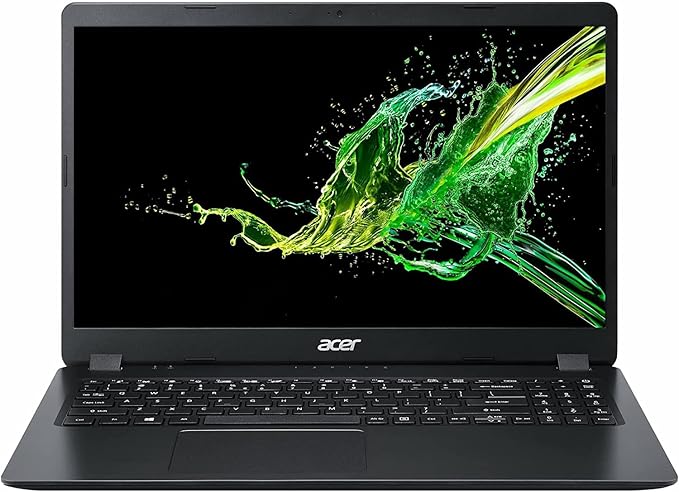
5. Dell Inspiron 15 – Premium Build Quality Under Budget
The Dell Inspiron 15 represents the sweet spot for users seeking premium construction without exceeding the $500 threshold. Dell’s legendary build quality shines through in the Inspiron line, with a metal-reinforced chassis that feels more durable than competitors at this price point. The AMD Ryzen 5 5500U processor delivers excellent single and multi-threaded performance, making it capable of handling demanding applications and moderately intensive tasks.
The 15.6-inch FHD anti-glare display protects against reflections and reduces eye strain, particularly valuable for professionals working long hours. The anti-glare coating also makes this laptop suitable for outdoor use. With 8GB DDR4 RAM and 256GB SSD storage, the Inspiron maintains responsiveness for typical workflows. Dell’s InfinityEdge bezel technology minimizes the frame around the display, creating a more immersive viewing experience. The keyboard offers excellent key travel and feedback, superior to many budget competitors. Premium features include a fingerprint reader for convenient Windows Hello authentication.
Key Specs: AMD Ryzen 5 5500U | 8GB RAM | 256GB SSD | 15.6″ FHD Anti-Glare Display | Up to 9 Hours Battery
★★★★★
$469.00

Complete Buying Guide for Budget Laptops Under $500
Understanding Processor Options
When shopping for budget laptops in 2026, processor selection significantly impacts overall performance. AMD Ryzen 5 processors (like the 5500U) offer superior multi-threaded performance and are excellent for multitasking, creative work, and content consumption. Intel Core i5 chips provide reliable single-threaded performance, slightly better for certain games and specialized software. Ryzen 3 and Core i3 processors handle basic tasks adequately but may struggle with intensive applications. For the best value under $500, prioritize Ryzen 5 or Core i5 options.
RAM and Storage Considerations
Minimum viable RAM for 2026 is 8GB DDR4, which handles everyday computing without excessive lag. While 16GB would be ideal, most budget laptops max out at 8GB due to cost constraints. Storage is equally important: 512GB SSDs are preferable to 256GB, as modern applications and Windows updates consume significant space. If considering a 256GB drive, be prepared to manage storage actively or invest in external drives. Never accept HDD storage—SSD performance is non-negotiable in 2026.
Display Quality Impact
The display is your primary interface with the laptop. IPS panels offer superior color accuracy and viewing angles compared to TN panels. At the budget level, this difference becomes more noticeable during extended viewing sessions. Anti-glare coatings reduce eye strain and reflections, particularly valuable for office workers or outdoor use. Screen brightness (measured in nits) affects usability in bright environments—aim for at least 250 nits. FHD (1920×1080) resolution is standard and appropriate for 15.6-inch screens; anything lower looks noticeably pixelated.
Battery Life Expectations
Budget laptops typically deliver 7-10 hours of mixed usage battery life, though real-world performance depends on workload and settings. Video streaming and web browsing tend to deplete batteries faster than document editing. For students and remote workers, prioritize laptops promising 8+ hours. Remember that battery life degrades over time; expect 10-20% reduction after 1-2 years. Carrying your charger is prudent regardless of rated battery life.
Build Quality and Durability
Budget doesn’t mean fragile. Dell and ASUS typically offer superior build quality with metal chassis reinforcement, while some HP and Lenovo models use primarily plastic construction. Check hinge durability, keyboard response, and trackpad sensitivity through reviews. A solidly built budget laptop often outlasts more expensive machines with poor construction. Warranty coverage varies; verify whether your purchase includes accidental damage protection or extended coverage options.
Operating System and Software
All laptops under $500 ship with Windows 11 Home, which includes Microsoft Defender antivirus protection. Budget laptops sometimes include bloatware (pre-installed trial software); plan to uninstall these immediately. Microsoft Office isn’t included—consider free alternatives like Google Workspace or Office 365 with an educational discount if applicable. Check whether your budget includes necessary software licenses or whether purchasing them separately fits your budget.
Connectivity and Ports
Verify that your chosen laptop includes essential connectivity: at least 2 USB-A ports for legacy devices, 1 USB-C port for modern peripherals, HDMI for external displays, and a 3.5mm headphone jack. Wireless connectivity should include Wi-Fi 6 (802.11ax) for faster internet speeds. Budget models may lack Thunderbolt 3, which is acceptable unless you work with high-speed external storage.
Best Use Cases Under $500
For Students: Lenovo IdeaPad 3 or HP 15s offer excellent value for note-taking, research, and online courses. Weight and portability are crucial.
For Office Work: ASUS VivoBook 15 or Dell Inspiron 15 provide the performance and build quality for professional environments.
For Casual Users: HP 15s or Acer Aspire 3 suffice for streaming, browsing, and email without overspending.
For Content Creation: ASUS VivoBook 15 with Ryzen 5 5500U offers the best processor performance for video editing and photography work.
Frequently Asked Questions
Can I upgrade RAM and storage in budget laptops under $500?
Most budget laptops feature soldered RAM, making upgrades impossible. However, storage (SSD) is often upgradeable via M.2 slots. Before purchasing, verify upgrade paths in product specifications. Some models restrict access to internal components, requiring professional technician assistance for upgrades.
Is 256GB storage sufficient for 2026?
Barely. Windows 11 occupies 20-30GB, leaving roughly 200GB for applications and files. This gets consumed quickly with modern applications. 512GB is the recommended minimum; if you’re a heavy media user or install many applications, strongly consider external SSD storage alongside a 256GB drive model.
Which budget laptop is best for gaming?
The ASUS VivoBook 15 and Acer Aspire 3 with their stronger processors handle casual gaming (competitive shooters on low settings, indie titles) adequately. Expect 30-60 FPS in less demanding games. For serious gaming, budgets above $700-800 are more appropriate. Integrated graphics aren’t designed for high-performance gaming.
How long will a budget laptop last?
A well-maintained budget laptop typically remains viable for 4-5 years for basic computing tasks. Performance degradation occurs gradually. Battery life decreases significantly after 2-3 years. For professional use requiring latest software, expect 3-4 years of comfortable usage. Regular maintenance—removing dust, updating drivers—extends lifespan.
Should I buy a budget laptop or wait for sales on premium models?
Budget laptops typically depreciate slowly; purchasing refurbished or previous-generation premium models at discount often provides better value than new budget machines. However, new budget laptops include full warranties and latest operating system versions. If immediate need exists, budget options are perfectly acceptable. If you can wait, monitoring premium model sales during holidays may yield superior long-term value.
Final Verdict: Which Budget Laptop Should You Choose?
The best budget laptop under $500 depends entirely on your specific needs and priorities. However, based on comprehensive analysis of 2026 market options, the ASUS VivoBook 15 emerges as the overall best choice due to its exceptional processor performance, adequate storage capacity, and superior display quality at $449. It strikes the optimal balance between price and performance, offering genuine improvements in responsiveness compared to lower-tier competitors.
For students with ultra-tight budgets, the HP 15s-eq2xxx at $379 represents maximum savings without sacrificing essential functionality. Its Ryzen 3 processor handles coursework adequately, and the price leaves room for peripherals or software.
Professionals prioritizing build quality and keyboard experience should choose the Dell Inspiron 15, whose superior construction and anti-glare display justify the $469 price tag. The fingerprint reader and metal chassis feel considerably more premium than competitors.
Ultimately, all five laptops represent legitimate options under the $500 threshold. Your choice should prioritize your most important factor: whether that’s processor speed, storage capacity, display quality, build durability, or maximum affordability. Each model excels in its category, ensuring that regardless of selection, you’ll receive a functional device capable of handling everyday computing demands in 2026.
