Best Kindle 2026: Which Amazon E-Reader Should You Buy?
Table of Contents
Amazon’s Kindle lineup in 2026 is the strongest it’s ever been. With the introduction of color displays, AI-powered note-taking, and faster processors, choosing the right Kindle has become both exciting and slightly overwhelming. We’ve tested every current model to help you find the perfect e-reader for your reading style and budget.
Whether you’re a casual reader who picks up a book on weekends, a voracious bookworm who devours novels daily, or a student who needs to annotate textbooks — there’s a Kindle built specifically for you. Here’s our comprehensive guide to every Kindle you can buy right now.
Quick Comparison Table
| Model | Screen | Storage | Color | Price | Best For |
|---|---|---|---|---|---|
| Kindle Paperwhite | 7″ 300ppi | 16GB | No | $139 | Most readers |
| Kindle (Basic) | 6″ 300ppi | 16GB | No | $109 | Budget/casual |
| Kindle Colorsoft | 7″ 300ppi | 32GB | Yes | $279 | Comics, magazines |
| Kindle Scribe Colorsoft | 11″ color | 64GB | Yes | $449 | Notes & documents |
| Paperwhite SE | 7″ 300ppi | 32GB | No | $189 | Premium reading |
1. Kindle Paperwhite — Best Overall E-Reader

Kindle Paperwhite (16GB)
★★★★★ 4.7/5 (42,000+ reviews)
$139.99
Best Overall Editor’s Choice
Check Price on Amazon
The Kindle Paperwhite is the sweet spot of Amazon’s lineup and the one we recommend to most readers. The latest model features a larger 7-inch glare-free display with 300 ppi resolution — text looks as crisp as a printed page. It’s 20% faster than its predecessor, with page turns that feel nearly instant.
Key Features: 7″ glare-free display, 300 ppi, 16GB storage (~16,000 books), adjustable warm light, waterproof (IPX8), USB-C charging, up to 12 weeks battery life.
Pros
- Best value in the Kindle lineup
- Larger 7″ screen is a significant upgrade
- Waterproof — read in the bath or pool
- Adjustable warm light for night reading
- Incredibly long battery life
Cons
- No color display
- No wireless charging (SE model has it)
- 16GB only (no 32GB option)
2. Kindle (Basic) — Best Budget E-Reader

Kindle (16GB) — Latest Model
★★★★☆ 4.5/5 (28,000+ reviews)
$109.99
Best Budget
Check Price on Amazon
The entry-level Kindle has come a long way. The latest model now includes a 300 ppi display (matching the Paperwhite), a front light, and USB-C charging. At $109, it’s the most affordable way to join the Kindle ecosystem without compromising on text quality.
Key Features: 6″ glare-free display, 300 ppi, 16GB storage, front light (4 LEDs), USB-C, up to 6 weeks battery, lightweight (158g).
Pros
- Lowest price point at $109
- Same 300 ppi display as Paperwhite
- Ultra-lightweight — perfect for travel
- USB-C charging (finally!)
Cons
- Smaller 6″ screen
- Not waterproof
- Fewer front light LEDs (dimmer)
- No warm light option
3. Kindle Colorsoft Signature Edition — Best for Color Content
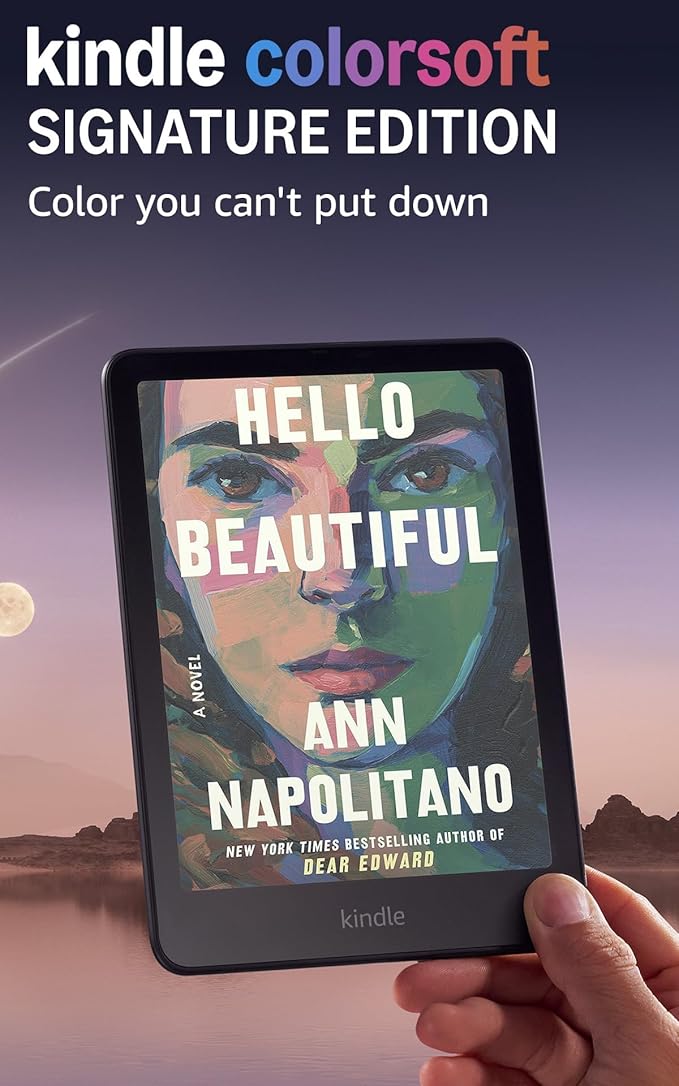
Kindle Colorsoft Signature Edition (32GB)
★★★★☆ 4.3/5 (8,500+ reviews)
$279.99
Best for Color
Check Price on Amazon
The Kindle Colorsoft is Amazon’s first color e-reader, and it’s a game-changer for anyone who reads comics, graphic novels, magazines, or illustrated books. The 7-inch Colorsoft display uses oxide-backplane technology to deliver paper-like color that’s easy on the eyes — nothing like the harsh backlit screens of tablets.
Key Features: 7″ Colorsoft display, 300 ppi, 32GB storage, color E Ink, auto-adjusting light, wireless charging, waterproof (IPX8).
Pros
- Beautiful paper-like color display
- Book covers and highlights in color
- Wireless charging included
- 32GB storage for comics/graphic novels
- Waterproof
Cons
- Expensive at $279
- Color isn’t as vibrant as iPad
- Overkill if you only read text
4. Kindle Scribe Colorsoft — Best for Note-Taking

Kindle Scribe Colorsoft (64GB) with Premium Pen
★★★★☆ 4.4/5 (5,200+ reviews)
$449.99
Best for Notes
Check Price on Amazon
The Kindle Scribe Colorsoft combines the best e-reader with a full notebook experience. The massive 11-inch color display makes it feel like writing on real paper with the included Premium Pen. AI-powered tools can summarize your notes, convert handwriting to text, and organize your notebooks automatically.
Key Features: 11″ Colorsoft display, 64GB/128GB, Premium Pen included, AI note-taking, handwriting-to-text, built-in notebooks, USB-C, up to 12 weeks battery.
Pros
- Huge 11″ color display — incredible for reading
- Premium Pen included — write directly on pages
- AI-powered note organization
- Replace paper notebooks entirely
- 64GB+ storage for documents
Cons
- Most expensive Kindle at $449+
- Large and heavy for one-handed reading
- Pen features not useful for casual readers
5. Kindle Paperwhite Signature Edition — Best Premium Reader
Kindle Paperwhite Signature Edition (32GB)
★★★★★ 4.7/5 (15,000+ reviews)
$189.99
Best Premium

Check Price on Amazon
The Paperwhite Signature Edition is the Paperwhite’s premium sibling — same excellent reading experience plus auto-adjusting front light, wireless charging, and double the storage at 32GB. If you read a lot of audiobooks alongside ebooks or want the convenience of just dropping your Kindle on a charging pad, this is the one.
Key Features: 7″ glare-free display, 300 ppi, 32GB storage, auto-adjusting light sensor, Qi wireless charging, waterproof (IPX8), metallic finishes.
Pros
- Wireless charging — just drop on a pad
- Auto-adjusting light (no manual brightness)
- 32GB storage — room for audiobooks too
- Premium metallic design
Cons
- $50 more than standard Paperwhite
- No color display
- Wireless charger not included
Buying Guide: How to Choose the Right Kindle
Budget: How Much Should You Spend?
Under $120: The basic Kindle at $109 is excellent for casual readers. $140-$190: The Paperwhite range offers the best value for regular readers. $280+: Color and Scribe models are for specific needs — color content or note-taking.
Screen Size: Does It Matter?
For pure reading, the 7″ Paperwhite is the sweet spot — large enough to be comfortable, small enough to hold one-handed. The 6″ basic Kindle is fine for paperback-style reading. The 11″ Scribe is really for people who annotate or take notes.
Color vs Black & White
If you primarily read novels — skip color. The black-and-white display has better contrast and longer battery life. Color is worth it only if you regularly read comics, graphic novels, magazines, or illustrated content.
Storage: 16GB vs 32GB vs 64GB
16GB holds roughly 16,000 ebooks — more than enough for most readers. Go 32GB if you download audiobooks. The 64GB Scribe is for heavy document and note storage.
Waterproofing
The Paperwhite, Colorsoft, and Scribe are all IPX8 waterproof. The basic Kindle is not. If you read in the bath, pool, or beach — get a waterproof model.
Frequently Asked Questions
Which Kindle should I buy in 2026?
For most people, the Kindle Paperwhite ($139) is the best choice. It offers the ideal balance of screen size, features, and price. Only consider the Colorsoft if you read comics, or the Scribe if you take notes on documents.
Is the Kindle Colorsoft worth the extra money?
Only if you regularly read color content. For novels and text-based books, the standard Paperwhite actually provides a better reading experience with higher contrast and longer battery life. The Colorsoft shines with comics, manga, and magazines.
Can I read library books on a Kindle?
Yes! All Kindle models support library borrowing through Libby/OverDrive. You can borrow ebooks from your local library for free and read them on any Kindle. This alone makes a Kindle worth the investment.
Kindle vs iPad for reading — which is better?
For dedicated reading, Kindle wins hands down. The E Ink display causes zero eye strain, battery lasts weeks not hours, and there are no distracting notifications. iPads are better if you need a multi-purpose device, but for pure reading comfort, nothing beats a Kindle.
Do I need the ad-supported or ad-free version?
Ad-supported Kindles show ads on the lock screen only — never while reading. The difference is usually $20. If the lock screen ads bother you, pay the extra $20. Otherwise, save the money — you won’t notice them while reading.
Final Verdict
The Kindle Paperwhite ($139) remains our #1 recommendation for 2026. It offers the best reading experience at a reasonable price — the 7-inch screen, warm light, waterproofing, and weeks-long battery make it perfect for virtually any reader.
For budget buyers, the basic Kindle ($109) is a fantastic entry point. And if you want color, the Kindle Colorsoft ($279) finally delivers on the promise of color E Ink.