Best Monitor Arms 2026: Free Up Your Desk Space
Table of Contents
Quick Comparison Table
| Product | Price | Max Weight | Monitor Size | Rotation | Best For |
|---|---|---|---|---|---|
| Ergotron LX Desk Mount | $200-250 | 25 lbs | 34″ | Full | Premium Users |
| AmazonBasics Monitor Arm | $35-50 | 20 lbs | 32″ | Full | Budget Conscious |
| HUANUO Monitor Arm | $45-60 | 22 lbs | 32″ | Full | Value Seekers |
| North Bayou Monitor Arm | $60-80 | 27 lbs | 34″ | Full | Heavy Monitors |
| VIVO Dual Monitor Arm | $80-120 | 35 lbs | 32″ | Full | Multi-Monitor Setup |
Best Monitor Arms 2026
1. Ergotron LX Desk Mount
Ergotron LX Desk Mount Monitor Arm with USB Hub
★★★★★
$245.00
Premium Pick
The Ergotron LX is the gold standard for monitor arms, offering exceptional build quality and functionality. This premium desk mount supports up to 25 lbs and accommodates monitors up to 34 inches. The patented design features effortless monitor adjustment with minimal resistance, allowing you to reposition your display with a single finger. The integrated cable management system keeps your workspace tidy, while the included USB hub adds convenient connectivity.
Pros:
- Smooth, effortless adjustments with excellent build quality
- Integrated USB hub for added convenience
- Complete range of motion with full rotation capability
- 10-year warranty demonstrates manufacturer confidence
- Handles ultra-wide and large monitors reliably
Cons:
- Premium price point may not suit all budgets
- Installation requires drilling for permanent mounting
- Heavier arm means less desk space saved compared to lighter models

2. AmazonBasics Monitor Arm
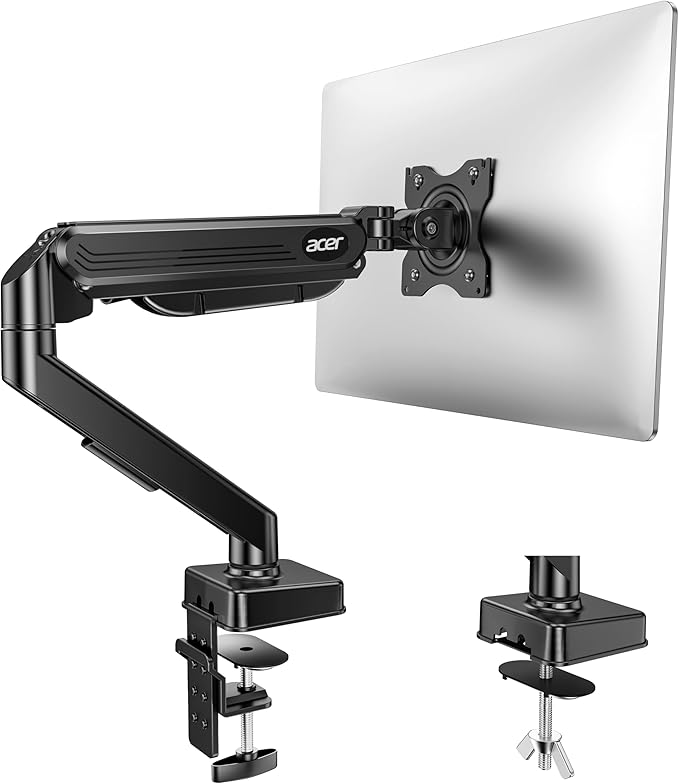
AmazonBasics Single Monitor Arm Desk Mount
★★★★☆
$39.99
Best Budget Option
AmazonBasics delivers excellent value with this straightforward monitor arm that punches above its weight in the budget category. Supporting monitors up to 32 inches and weighing up to 20 lbs, this arm provides full articulation for height, tilt, and rotation adjustments. The VESA-compatible mounting system works with virtually all modern monitors. While it lacks premium features, the solid construction and hassle-free setup make it an ideal choice for office workers and students on a tight budget.
Pros:
- Unbeatable price point under $40
- Quick and simple installation process
- Full range of motion adjustments
- Widely available through Amazon Prime
- Works with most standard monitors
Cons:
- Lower weight capacity limits heavier monitors
- Less premium feel than higher-priced alternatives
- Minimal cable management features
- May require occasional tension adjustments
3. HUANUO Monitor Arm
HUANUO Single Monitor Desk Mount Arm
★★★★☆
$49.99
Best Value
HUANUO strikes an excellent balance between affordability and functionality, making it perfect for users who want more features without the premium price tag. This arm supports monitors up to 32 inches and 22 lbs, with a spring-based tension adjustment system that provides smooth movement throughout the entire range. The aluminum construction feels solid and durable, while the VESA 75/100 compatibility ensures broad device support. Perfect for home offices and creative professionals.
Pros:
- Excellent balance of price and performance
- Aluminum construction feels premium for the price
- Smooth spring-based tension system
- Great cable management options
- Easy adjustment and positioning
Cons:
- Slightly lower weight capacity than competitors
- Not ideal for ultra-wide monitors
- Spring tension may need occasional resetting

4. North Bayou Monitor Arm
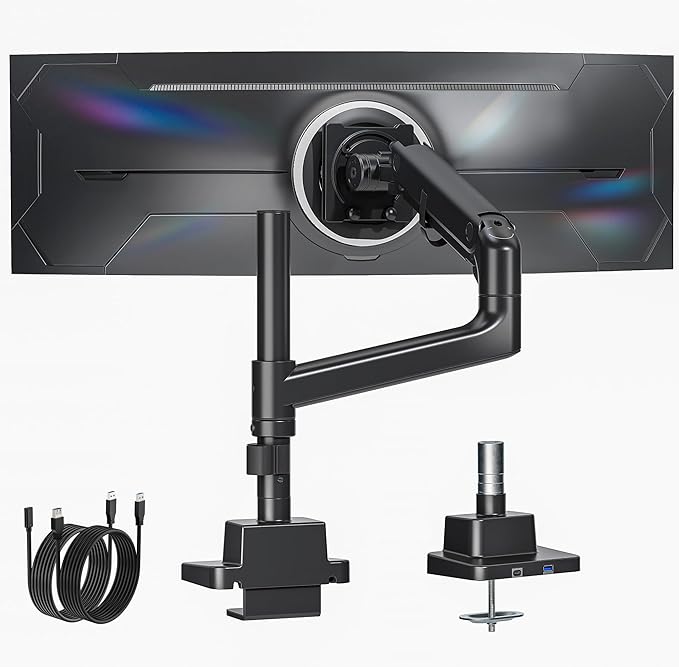
North Bayou F80 Monitor Desk Mount Arm
★★★★★
$69.99
Best for Heavy Monitors
North Bayou’s F80 is engineered for demanding applications, supporting up to 27 lbs and monitors as large as 34 inches. The robust aluminum construction and reinforced spring system provide exceptional stability even with the heaviest displays. This arm excels at maintaining its position once adjusted, with minimal drift or movement. The extensive rotation range and smooth adjustment mechanics make it ideal for professionals using large 4K or gaming monitors. North Bayou’s reputation for durability is well-earned.
Pros:
- High weight capacity handles heavy monitors
- Excellent stability and position retention
- Robust aluminum construction
- Works with large and ultra-wide displays
- Smooth gas spring adjustment system
Cons:
- Slightly heavier than lightweight alternatives
- May be overkill for standard-weight monitors
- Takes up more desk space than minimalist designs
5. VIVO Dual Monitor Arm
VIVO Dual Monitor Desk Mount Stand
★★★★★
$99.99
Best for Multi-Monitor Setup
If you’re running a dual-monitor setup, the VIVO dual arm is a game-changer for maximizing desk space. This integrated system supports up to 35 lbs total and accommodates two monitors up to 32 inches each. The independent adjustment for each monitor arm gives you complete flexibility in positioning. The vertical stacking capability saves significant desk real estate compared to side-by-side monitor stands. Heavy-duty construction ensures stability with multiple displays, making it perfect for traders, programmers, and content creators.
Pros:
- Exceptional space savings with vertical stacking option
- Independent control of each monitor
- High weight capacity for dual monitors
- Superior stability with heavy-duty construction
- Better for productivity workflows requiring multiple displays
Cons:
- Only suitable if you need two monitors
- Larger footprint than single-arm options
- More complex installation process
- Cable management more challenging with dual setup

Monitor Arm Buying Guide
Why Invest in a Monitor Arm?
Monitor arms have become essential for modern desk setups, offering far more than simple cord management. By elevating your display to eye level, a quality monitor arm improves ergonomics and reduces neck strain during extended work sessions. The desk space freed up beneath your monitor can accommodate keyboards, paperwork, or additional office equipment. For professionals spending 8+ hours daily at a desk, the health benefits alone justify the investment.
Key Specifications to Consider
Weight Capacity: Ensure the arm supports your monitor’s weight plus a small safety margin. Modern 4K and gaming monitors can exceed 20 lbs, so don’t underestimate this specification. Most quality arms support 20-35 lbs, with premium options handling even heavier displays.
Monitor Size Compatibility: VESA mounting patterns (75x75mm or 100x100mm) are standard on most modern monitors. Check your monitor’s specifications to ensure compatibility. Some arms accommodate monitors up to 34 inches, while budget options max out around 27-30 inches.
Range of Motion: Evaluate the height adjustment range, tilt capability (typically -90 to +45 degrees), swivel rotation (most offer 360 degrees), and pivot rotation. Premium arms like Ergotron provide smooth adjustment throughout, while budget options may have resistance at certain angles.
Installation Method: Desktop clamps offer non-permanent mounting ideal for renters, while desk mounting requires drilling. Clamps are easier to install but take up desk edge space. Grommet mounts fit through desk grommets for cleaner aesthetics.
Cable Management: Integrated cable routing systems keep your workspace tidy. Premium arms include clips and channels, while budget options may offer minimal cable management features.
Ergonomic Benefits
Proper monitor positioning reduces physical strain significantly. Your monitor should be positioned so the top of the screen is at or slightly below eye level when sitting with good posture. The arm should be approximately 20-26 inches from your eyes. Monitor arms make achieving this perfect position effortless, adjustable throughout your workday as needed.
Space Optimization
Monitor arms free up valuable desk real estate occupied by monitor stands. This reclaimed space can accommodate dual keyboards, input devices, documents, or decorative items. For small workspaces and apartments, this space-saving benefit is transformative. Dual-monitor arms provide even greater efficiency for professionals requiring multiple displays.
Durability and Longevity
Quality monitor arms last 5-10+ years with proper installation. Premium brands like Ergotron back their products with extensive warranties. The gas spring mechanism in quality arms maintains consistent tension over time, while cheaper alternatives may sag or lose positioning capability. Investing in a durable arm saves replacement costs and frustration.
Budget Considerations
Monitor arm prices range from $35 to $300+. Budget options ($35-60) work well for standard monitors and basic needs. Mid-range arms ($60-150) offer better construction and additional features. Premium options ($150+) provide superior ergonomics and longevity. Consider your monitor’s weight, intended use duration, and desk setup to determine appropriate investment level.
Frequently Asked Questions
What’s the difference between VESA 75 and VESA 100?
VESA mounting patterns refer to the distance between mounting holes on monitor backs. VESA 75 has holes 75mm apart, while VESA 100 has 100mm spacing. Most modern monitors support VESA 100, but some smaller displays only use VESA 75. Quality monitor arms support both patterns with interchangeable adapters.
Can I mount a 34-inch ultra-wide monitor on any arm?
No. Ultra-wide monitors often exceed 25 lbs and require arms specifically designed for large displays. The North Bayou and Ergotron models listed above handle 34-inch ultra-wide monitors, but budget options typically max out around 27 inches. Always verify your monitor’s weight and size against the arm’s specifications.
Is installation difficult?
Desktop clamp installation takes 5-10 minutes and requires only an included hex wrench. Desk mounting requires drilling holes and takes 15-30 minutes with basic tools. Most users find installation straightforward by following included instructions. Professional installation is available from many retailers for a fee.
Will a monitor arm work with my curved or gaming monitor?
Yes, provided your curved or gaming monitor has VESA mounting holes (most do) and falls within the weight capacity. Curved and gaming monitors can be slightly heavier than standard displays, so verify specifications carefully. All arms recommended above support modern gaming displays.
Can I use a monitor arm with a standing desk?
Absolutely. Monitor arms work excellently with standing desks, automatically adjusting as you change height. Dual-monitor arms are particularly popular with standing desk users. Ensure your desk surface is strong enough to support clamp or mounting hardware, especially with heavier monitors.
Final Verdict
Choosing the right monitor arm depends on your specific needs, budget, and setup. For premium quality and effortless adjustments, the Ergotron LX Desk Mount remains unmatched, though it comes with a premium price. If budget is your primary concern, the AmazonBasics Monitor Arm delivers surprising value under $40, making it excellent for casual users and students.
The HUANUO Monitor Arm represents the sweet spot for most users, offering excellent build quality and functionality at a mid-range price point. For those with heavier monitors or requiring maximum stability, the North Bayou F80 provides robust construction and impressive weight capacity. Finally, if you’re running a dual-monitor professional setup, the VIVO Dual Monitor Arm is transformative for space management and productivity.
Regardless of which model you choose, a monitor arm is one of the best investments you can make for your workspace. The ergonomic benefits, desk space reclamation, and improved cable management will immediately enhance your daily work experience. Start with the model that best matches your budget and monitor specifications, knowing that any quality arm will deliver years of reliable service.