Best NAS Storage 2026: Home Server & Backup Picks
Best NAS Storage 2026: Home Server & Backup Picks
Table of Contents
Quick Comparison Table
| Product | Bays | Max Storage | CPU | RAM | Price |
|---|---|---|---|---|---|
| QNAP TS-264C3U | 2 | 108TB | Intel Celeron | 8GB | $599 |
| Synology DS923+ | 4 | 176TB | AMD Ryzen | 4GB | $449 |
| WD Red Pro 12TB | Drive | 12TB | N/A | N/A | $299 |
| Asustor AS6604T | 4 | 176TB | Intel Celeron | 8GB | $529 |
| Buffalo TeraStation TS5420DN | 4 | 192TB | Intel Atom | 4GB | $699 |
Top 5 NAS Systems for 2026
1. Synology DS923+ 4-Bay NAS
The Synology DS923+ remains the gold standard for home NAS storage in 2026. Featuring a powerful AMD Ryzen processor, expandable memory up to 32GB, and support for 8K video transcoding, this unit delivers exceptional performance for multimedia enthusiasts and small business users alike. The DiskStation Manager (DSM) 7.2 operating system provides an intuitive interface with robust backup capabilities, virtual machine support, and extensive app ecosystem.
Key Specs: 4 bays, AMD Ryzen 5000 series, 4GB DDR4 RAM (expandable to 32GB), Gigabit Ethernet, M.2 NVMe slots
★★★★★
$449.00

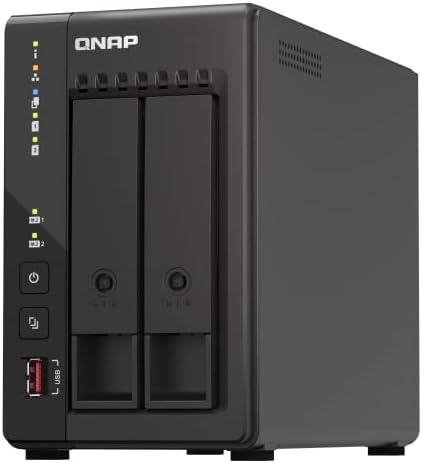
2. QNAP TS-264C3U 2-Bay Compact NAS
QNAP’s TS-264C3U is perfect for users with space constraints who still demand professional-grade performance. Its compact 1U rackmount design doesn’t sacrifice functionality, featuring dual Gigabit ports, USB 3.2 connectivity, and QuTS Hero operating system support. The Intel Celeron processor handles 4K video playback smoothly, while 8GB of DDR4 RAM ensures multitasking efficiency. Ideal for small offices, studios, and advanced home users requiring 24/7 operation.
Key Specs: 2 bays, Intel Celeron N5095, 8GB DDR4 RAM, dual 2.5GbE ports, M.2 SSD slot
★★★★☆
$599.00
3. Asustor AS6604T 4-Bay NAS
The Asustor AS6604T offers excellent value for budget-conscious buyers without compromising performance. Equipped with an Intel Celeron processor, 8GB DDR4 RAM, and dual 2.5GbE ports, this 4-bay system supports up to 176TB of storage capacity. The ADM operating system features a clean interface, comprehensive backup tools, and support for containerized applications. Thermal optimization keeps operation quiet, making it suitable for home environments and office spaces.
Key Specs: 4 bays, Intel Celeron N5105, 8GB DDR4 RAM, dual 2.5GbE Ethernet, USB 3.2 Gen 1
★★★★☆
$529.00

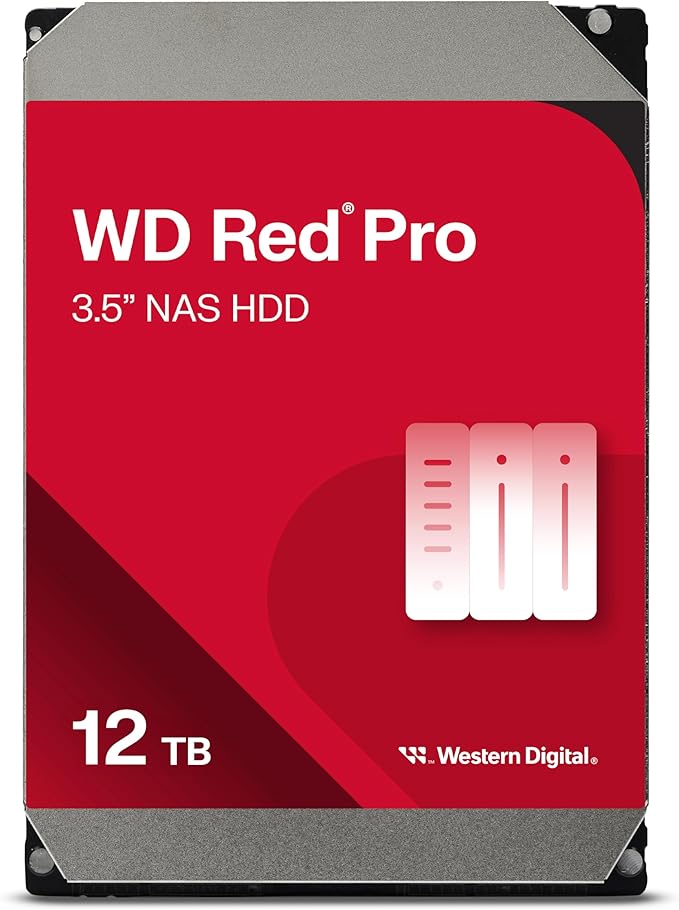
4. WD Red Pro 12TB NAS Hard Drive
WD Red Pro drives are engineered specifically for NAS environments, featuring IntelliPower technology that optimizes performance while reducing power consumption. The 12TB capacity provides substantial storage density, making these drives ideal for populating your NAS bays. With 256MB cache and 7200 RPM rotation, WD Red Pro handles 24/7 operation reliably. RAID optimization ensures compatibility with multi-bay NAS systems, delivering consistent performance and longevity across enterprise and prosumer deployments.
Key Specs: 12TB capacity, 7200 RPM, 256MB cache, NAS optimized, 5-year warranty
★★★★★
$299.00
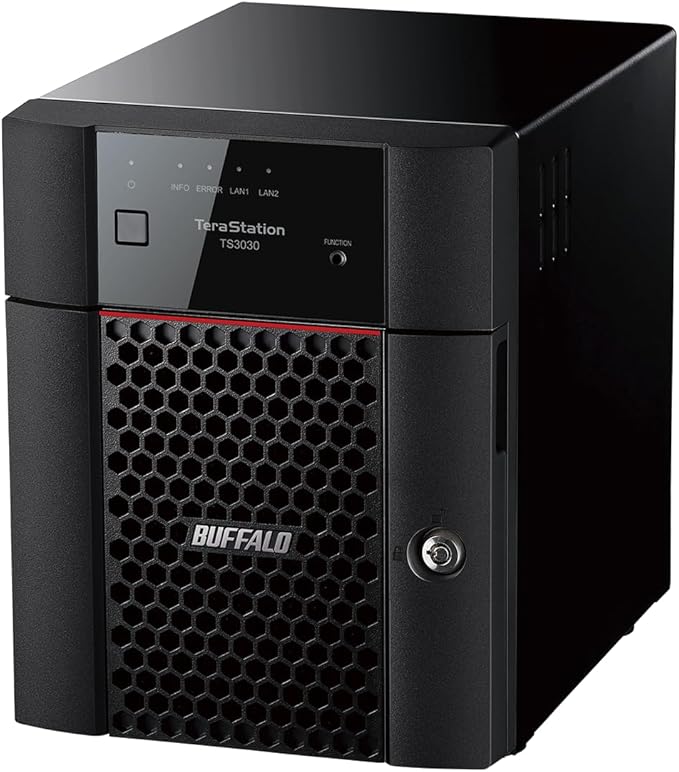
5. Buffalo TeraStation TS5420DN 4-Bay NAS
Buffalo’s TeraStation TS5420DN combines user-friendly design with powerful features for demanding backup scenarios. The Intel Atom processor efficiently handles file serving, video streaming, and backup tasks simultaneously. With 4 bays supporting up to 192TB total capacity and dual GbE ports for redundant connectivity, this system ensures high availability. The streamlined interface makes initial setup and ongoing management straightforward for users of all technical levels, while advanced features like snapshot technology provide data protection without complexity.
Key Specs: 4 bays, Intel Atom, 4GB DDR3 RAM, dual Gigabit Ethernet, USB 3.0
★★★★☆
$699.00
Complete NAS Storage Buying Guide
Understanding Your NAS Needs
Network Attached Storage (NAS) systems have evolved dramatically by 2026, offering capabilities that rival traditional enterprise solutions at consumer-friendly price points. Before selecting a NAS device, identify your primary use case: backup and archiving, media server functionality, virtual machine hosting, or business file sharing.
The number of storage bays directly impacts capacity expansion potential. A 2-bay system suits light users needing 20-40TB of usable storage, while 4-bay units accommodate small business requirements up to 176TB. Consider your growth trajectory over the next 3-5 years—investing in a slightly larger chassis now prevents expensive hardware replacement later.
Processor Power and Performance
NAS processors have seen significant improvements in 2026. AMD Ryzen processors found in premium models like the Synology DS923+ deliver multi-core performance enabling simultaneous transcoding, backup operations, and network file serving without bottlenecks. Intel Celeron options provide adequate performance for standard file serving and backup tasks at lower price points, making them suitable for budget-conscious buyers.
RAM capacity matters more than many realize. Base configurations often include 4GB, sufficient for typical workloads, but expandable memory to 8GB or 16GB dramatically improves performance when running virtual machines, containerized applications, or handling numerous simultaneous connections. Premium models supporting 32GB RAM enable serious virtualization and advanced data analytics.
Storage Drive Selection
Never populate your NAS with standard external drives—they’ll fail prematurely under 24/7 operation. Purpose-built NAS drives like WD Red Pro and Seagate IronWolf feature optimized firmware and workload optimization. The 12TB capacity sweet spot in 2026 balances cost per terabyte with power consumption. Planning a 4-bay system? Four 12TB drives deliver 36TB usable storage in RAID 5 configuration with single-drive failure protection.
Consider drive redundancy seriously. RAID 1 mirrors data across two drives—simple but halves usable capacity. RAID 5 distributes parity across three or more drives, offering optimal balance. RAID 6 provides dual-drive failure protection, essential for mission-critical data. Some systems support expanding RAID groups dynamically, allowing capacity increases without complete data migration.
Network Connectivity
Gigabit Ethernet proves adequate for most users, delivering approximately 125MB/s throughput. However, 2.5GbE ports increasingly appear on 2026 models, offering future-proofing at minimal cost premium. These faster connections enable rapid file transfers, reducing backup windows substantially. Dual Ethernet ports provide network redundancy and load balancing for business environments or high-traffic scenarios.
USB 3.2 ports enable external drive connectivity for offsite backup, direct computer connections, and peripheral support. High-end models include M.2 NVMe slots for caching, accelerating frequently-accessed data and improving overall system responsiveness. Some advanced users leverage these slots for tiered storage strategies, combining fast NVMe caches with economical HDD bulk storage.
Operating System Capabilities
Synology’s DSM and QNAP’s QuTS Hero lead the industry in feature completeness. Both support containerized applications, virtual machines, and comprehensive backup solutions. Asustor’s ADM offers comparable functionality at slightly lower resource requirements. Buffalo’s TeraStation keeps things simpler for users prioritizing straightforward file sharing and backup without extensive customization.
Backup capabilities deserve careful evaluation. Look for support of popular protocols like SMB, NFS, and rsync. Cloud integration with services like Amazon S3, Google Cloud, and Backblaze enables hybrid backup strategies. Some systems offer built-in backup scheduling and deduplication, reducing storage footprint of redundant backups by 50-80% in typical scenarios.
Power Consumption and Noise
NAS systems running 24/7 dramatically impact electricity bills. Efficient systems draw 30-60W under typical operation, while power-hungry options exceed 100W. Over a year, this difference adds $200-300 to energy costs. Check manufacturer specifications and real-world reviews documenting power draw under various workloads.
Acoustic noise matters if your NAS lives in a bedroom, living room, or office. Modern systems employ quiet cooling strategies—many running under 25dB, virtually inaudible. Avoid budget models with aggressive fan profiles, which can become distracting. Some users place NAS systems in basements or closets to minimize noise impact.
Future-Proofing Your Investment
NAS technology evolves rapidly. Select systems with active community support, regular firmware updates, and modern architecture ensuring relevance through 2028 and beyond. Synology and QNAP maintain extensive legacy support, but lesser-known brands sometimes abandon products after 2-3 years. Read user reviews documenting long-term satisfaction and update frequency.
Consider hybrid approaches—a robust 4-bay NAS supplemented with cloud backup services provides defense-in-depth against data loss. Services like Backblaze offer unlimited backup for $7/month, creating an affordable offsite copy protecting against catastrophic local failure. Total cost of ownership across hardware, drives, electricity, and cloud backup typically runs $1200-2000 annually for comprehensive home or small business protection.
Frequently Asked Questions
Q1: How much storage capacity do I actually need?
This depends entirely on usage. Light users backing up documents and photos need 20-30TB. Media enthusiasts with 4K video collections should plan 50-100TB. Small businesses typically require 100TB+. A practical rule: purchase 2x your current data volume, accounting for growth and keeping RAID overhead in mind (RAID 5 with three 12TB drives yields only 24TB usable space).
Q2: Can I really run NAS 24/7 without issues?
Yes, if you purchase quality drives designed for NAS environments. WD Red Pro, Seagate IronWolf, and Barracuda Pro drives handle continuous operation reliably. Standard external drives will fail within 6-12 months of 24/7 use. Proper ventilation and environmental conditions (cool, dry location) extend drive lifespan further. Budget for drive replacement every 5-7 years as preventive maintenance.
Q3: Which NAS is best for video surveillance recording?
Look for systems explicitly supporting surveillance, typically 8+ bay models like QNAP TS-873U or Synology DS3622xs+. These feature surveillance-optimized operating systems, IP camera compatibility, and sufficient processing power for real-time video analytics. 4-bay systems work for 4-6 camera setups, but serious installations require larger chassis. Budget $3000-8000 for complete surveillance NAS solutions.
Q4: Should I buy NAS and drives separately or bundled?
Purchasing separately offers flexibility—you choose specific drive models matching your reliability priorities. However, bundled options sometimes offer modest savings and include drives tested for compatibility. For 2026, most modern NAS systems support any standard 3.5″ or 2.5″ NAS drive, so compatibility rarely presents issues. We recommend buying separately to optimize drive selection.
Q5: Do I need professional installation or support?
Modern NAS systems feature straightforward setup—most users complete installation in 30 minutes. Professional installation typically adds $200-500 but provides peace of mind for expensive systems or complex networking requirements. Remote support services from major vendors offer troubleshooting assistance at $100-300/incident. For critical systems, professional support contracts ($50-100/month) ensure rapid response to issues.
Final Verdict
The Synology DS923+ stands as the best overall choice for 2026, combining excellent performance, robust software, and proven reliability at a reasonable $449 price point. Its AMD Ryzen processor handles advanced workloads, expandable RAM supports virtual machines, and DSM 7.2 delivers comprehensive backup and media server features suitable for home users and small businesses alike.
Budget-conscious buyers should seriously consider the Asustor AS6604T at $529, offering four bays, dual 2.5GbE connectivity, and expandable storage without excessive cost. Users requiring compact form factors will appreciate QNAP’s TS-264C3U, though its $599 price reflects premium positioning.
Don’t overlook storage drive quality—populating your NAS with WD Red Pro 12TB drives ensures reliable operation over many years. Expect to invest $400-500 in drives alone, but this proves economical compared to premature failures forcing expensive replacement cycles.
For serious backup protection, implement hybrid strategies combining on-site NAS with cloud backup. This defense-in-depth approach protects against both hardware failure and catastrophic local disasters. Total investment of $1200-2000 annually (hardware, drives, electricity, and cloud services) provides enterprise-grade protection at home or small business scale.
In 2026, NAS technology has matured sufficiently that nearly any modern system will prove reliable. Your decision should prioritize feature fit (number of bays, processing power, expandability) over brand alone. Review user comments documenting long-term experiences, update frequency, and actual performance under real-world workloads. Plan capacity conservatively, anticipating storage needs 3-5 years forward. With proper drive selection and backup strategies, a quality NAS system will serve faithfully for half a decade or longer.

View All NAS Systems on Amazon