Best Standing Desks 2026: Top Picks for Your Home Office
Table of Contents
Standing Desk Comparison Table
| Desk Model | Price | Best For | Motor Type | Height Range | Warranty |
|---|---|---|---|---|---|
| FlexiSpot E7 Pro | $479 | Best Overall Value | Dual Motor | 28″-48″ | 7 Years |
| Uplift V2 | $599 | Customization | Dual Motor | 22.6″-48.2″ | 7 Years |
| Secretlab Magnus Pro | $799 | Gaming/Esports | Dual Motor | 24″-50″ | 10 Years |
| Fezibo 55″ | $159 | Budget Conscious | Dual Motor | 28.5″-47.6″ | 3 Years |
| Herman Miller Nevi | $1,095 | Premium/Enterprise | Dual Motor | 22″-48″ | 12 Years |
FlexiSpot E7 Pro — Best Overall Standing Desk

FlexiSpot E7 Pro Electric Standing Desk
★★★★★
Quick picks
- Top pick: FlexiSpot E7 Pro Electric Standing Desk
- Also great: Uplift V2 Standing Desk
- Best value: Secretlab Magnus Pro Standing Desk
Prices change often, so check the current price before buying.
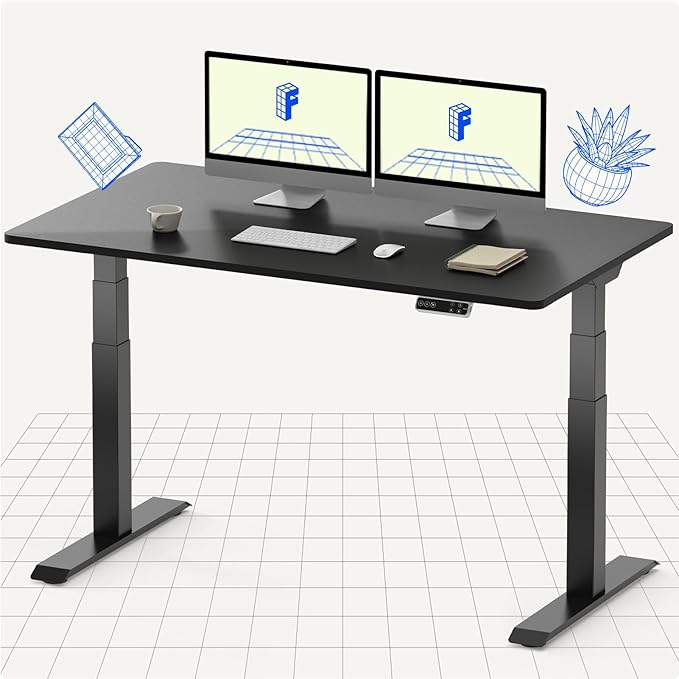
The FlexiSpot E7 Pro delivers professional-grade stability without the premium price tag. Featuring dual independent motors, this desk rises from 28″ to 48″, accommodating users of nearly any height. The advanced control panel includes three programmable height presets, allowing you to save your favorite sitting and standing positions for instant recall.
Build quality is exceptional for the price point. The 1.5mm powder-coated steel frame withstands daily transitions, and the stability is noticeably superior to single-motor competitors. The desk top glides smoothly between positions without wobbling, even when fully extended. At maximum height, the 60″ width desktop maintains rigidity across its entire span.
The included cable management system keeps your workspace organized with integrated grommets and clips. The control panel is intuitive, with memory buttons that store your preferred heights. Electric operation is whisper-quiet at roughly 50dB, making transitions seamless during video calls.
Pros
- Dual motor system ensures smooth, balanced height adjustments
- Exceptional build quality and stability at this price point
- Three programmable height presets with memory function
- Wide height range (28″-48″) accommodates most users
- Quiet operation ideal for shared workspaces
- 7-year manufacturer warranty
- Excellent cable management system included
Cons
- Limited desktop width options (60″ only for base model)
- No app control or smart home integration
- Desktop sold separately (additional cost)
- Assembly can take 1-2 hours
Uplift V2 Standing Desk — Best Customization

Uplift V2 Standing Desk
★★★★★
Uplift stands out for its unmatched customization ecosystem. With over 20 desktop surface options—from sustainable bamboo to premium hardwoods and engineered surfaces—you’ll craft a desk that matches your aesthetic and performance needs. Desktop widths range from 48″ to 80″, and depths from 24″ to 32″, giving you complete control over your workspace dimensions.
The V2 frame features dual motors with a whisper-quiet transition system. The 22.6″ to 48.2″ height range covers virtually all users, and the advanced control panel includes four programmable height presets. Advanced stabilization bars prevent wobbling even at maximum extension with a fully loaded desktop.
Build quality reflects the premium positioning. Uplift uses thicker gauge steel in critical areas and incorporates advanced cable management through integrated wire grommets positioned across the desk surface. The motor is rated for 16,000 cycles (approximately 8 years of daily use), significantly outlasting most competitors.
The company offers white-glove delivery and assembly on many configurations, and a full 30-day trial period lets you test the desk risk-free in your actual workspace.
Pros
- Exceptional customization: 20+ desktop materials and finishes
- Wide range of desktop sizes (48″-80″ width)
- Dual motor system with advanced stabilization
- Four programmable height presets
- Optional white-glove delivery and assembly available
- 30-day home trial period
- 7-year motor warranty with optional extended coverage
- Eco-friendly bamboo options available
Cons
- Premium pricing ($599 is mid-range, but custom desktops run higher)
- Customization complexity may overwhelm some buyers
- Desktop choices impact final price significantly
- Longer lead times for custom configurations (2-4 weeks)
Secretlab Magnus Pro — Best for Gaming
Secretlab Magnus Pro Standing Desk
★★★★☆
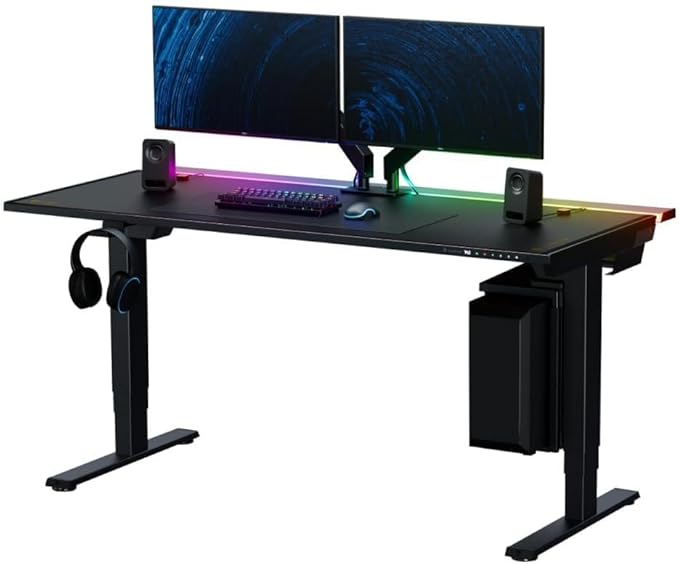
Secretlab’s Magnus Pro brings gaming desk aesthetics to the standing desk category. Purpose-built for gamers and esports enthusiasts, this desk incorporates integrated cable management channels, RGB underglow lighting, and a sleek, modern design that commands attention in any gaming setup.
The 24″ to 50″ height range accommodates gamers of all statures, and the 60″ desktop width provides ample space for multi-monitor setups with gaming peripherals. Dual motors ensure smooth transitions between sitting and standing heights, with three programmable position memories. The desk stabilizes firmly across its entire height range—critical for gaming where desk vibration can affect mouse accuracy and overall feel.
Cable management is where Magnus Pro truly shines. Built-in channels on the underside of the desktop route cables seamlessly, with several convenient cable grommets positioned for gaming peripherals. The optional RGB lighting system syncs with popular gaming software, adding ambiance while keeping your setup cable-free and organized.
The desktop surface uses a textured finish designed to reduce glare during extended gaming sessions. Premium finishes include white, black, and dark walnut wood options.
Pros
- Integrated cable management designed for multi-peripheral setups
- RGB underglow lighting with software syncing
- Dual motor system with excellent stability during gameplay
- Three memory presets for common gaming and working positions
- Wide height range (24″-50″) suits all gamers
- Premium build quality with 10-year warranty
- Textured desktop reduces monitor glare
- Gaming-optimized design with aesthetic appeal
Cons
- Higher price point ($799) limits budget-conscious buyers
- RGB features unnecessary for non-gaming use cases
- Limited desktop size options (primarily 60″ width)
- Premium positioning means fewer material choices
Fezibo Electric Standing Desk 55″ — Best Budget Option
Fezibo Electric Standing Desk 55″
★★★★☆
The Fezibo 55″ standing desk proves you don’t need to spend big to enjoy the health benefits of a sit-stand workspace. At just $159, this desk delivers surprising functionality: dual motors, three programmable presets, and a respectable 28.5″ to 47.6″ height range that works for most users.
Don’t let the budget price fool you. Fezibo includes dual independent motors that ensure balanced, level raising and lowering. The 55″ desktop provides adequate space for a monitor setup, keyboard, and essential peripherals. The control panel is straightforward—three memory buttons plus up/down controls. Height adjustments are noticeably slower than premium competitors (approximately 38 seconds to traverse full range), but smooth without stuttering.
Stability is adequate for light to moderate work. The frame is more prone to wobbling at maximum height compared to dual-motor premium desks, but the wobble is minor and only noticeable when applying direct pressure. For typical office work, this won’t impact daily usability.
Cable management is basic—no integrated channels, but the underside has enough clearance for cable routing. Assembly is straightforward and takes about 30-45 minutes with basic tools.
Pros
- Exceptional value at $159—lowest cost dual-motor desk available
- True dual motor system ensures balanced operation
- Three programmable height presets with memory function
- Adequate height range (28.5″-47.6″) for most users
- Simple, intuitive controls perfect for beginners
- Functional cable management underneath
- Fast shipping via Amazon Prime eligible
- Customer-friendly return policies
Cons
- Slower height adjustments (~38 seconds full range)
- More noticeable wobble at full extension
- Fixed 55″ width—no size customization
- Shorter 3-year warranty vs. premium competitors
- Desktop sold separately
- No premium materials or aesthetic options
- Limited cable management compared to higher-end models
Herman Miller Nevi — Best Premium Standing Desk
Herman Miller Nevi Standing Desk
★★★★★
Herman Miller’s Nevi represents the gold standard in standing desk engineering. This is the choice for corporate offices, design studios, and executives who demand the absolute best. The 12-year warranty reflects Herman Miller’s confidence in manufacturing excellence—double the warranty of competitors.
The Nevi’s frame is engineered with precision tolerances, using higher-grade materials throughout. The dual motor system is virtually silent and incredibly fast—transitioning the full height range in under 15 seconds. The 22″ to 48″ height accommodates users across the full spectrum, from petite to tall professionals.
Cable management is sophisticated, with integrated channels and grommets positioned strategically for cable routing. The control system is customizable—choose from wireless or wired controllers, and select how many preset positions you want (typically 4-6). Herman Miller offers extensive customization of desktop materials, finishes, and dimensions, allowing enterprises to standardize desks across entire departments.
Build quality is evident in every detail. The frame welds are immaculate, the powder coat is uniform, and the mechanisms operate with Swiss-watch precision. This is a desk built to last decades, suitable for demanding professional environments.
Herman Miller’s customer service is exceptional, including white-glove delivery, assembly, and ongoing support. The company stands behind every product with uncompromising commitment to customer satisfaction.
Pros
- Legendary Herman Miller build quality and engineering
- 12-year manufacturer warranty (industry leading)
- Ultra-quiet, fast dual motor system
- Exceptional stability and precision throughout height range
- Comprehensive customization options for materials and dimensions
- Sophisticated cable management system
- Optional wireless controller available
- White-glove delivery and assembly included
- Backed by decades of office furniture expertise
- Suitable for enterprise deployments across entire offices
Cons
- Premium pricing at $1,095+ (not accessible to all budgets)
- Overkill for home office or casual use cases
- Longer lead times for custom specifications (3-6 weeks)
- Requires Herman Miller dealer for customization and support
- Desktop sold separately (additional significant cost)
Complete Standing Desk Buying Guide
Why Choose a Standing Desk?
The shift toward standing desks in 2026 reflects growing workplace health awareness. Sitting for extended periods correlates with cardiovascular disease, obesity, and musculoskeletal disorders. Electric standing desks enable sit-stand transitions throughout the day, breaking up sedentary time and engaging different muscle groups. Research shows users who alternate sitting and standing report reduced back pain, increased energy levels, and improved focus during afternoon hours.
Beyond health benefits, standing desks increase office flexibility. Remote workers can adjust their workspace ergonomics throughout the day, accommodating different working tasks. Creative professionals alternate between standing for brainstorming and sitting for detailed work. The psychological benefit of position control also increases user satisfaction and workplace contentment.
Key Specifications to Consider
Motor Type and Performance: Single-motor desks are cheaper but raise unevenly, tilting your desktop during transitions. Dual-motor desks (like our top picks) raise both sides independently, keeping your desktop level regardless of loading. Advanced dual-motor systems include separate height sensors on each motor, preventing binding and wobbling. Look for motors rated for at least 10,000 cycles—this translates to roughly 5 years of daily use (4 transitions per day).
Height Range: Standard ranges fall between 22″ (minimum sitting height) and 48″ (maximum standing height). Users under 5’6″ need a lower minimum; users over 6’2″ need a higher maximum. The FlexiSpot E7 Pro’s 28″-48″ range covers approximately 90% of users. Herman Miller extends to 22″-48″, accommodating petite users. Secretlab’s 24″-50″ range works best for taller standing desk users.
Desktop Size: Most standing desks come frame-only, requiring a separate desktop purchase. Common widths range from 48″ to 80″; depths from 24″ to 32″. A 60″ x 30″ desktop is the standard for solo work. Dual-monitor setups benefit from 72″+ widths. Smaller depths (24″) limit peripheral placement but save floor space in compact home offices.
Stability and Wobble: Wobble is the enemy of standing desk user experience. Premium dual-motor systems with advanced damping mechanisms virtually eliminate wobble. Budget options exhibit noticeable wobble at full height, particularly with heavy desktops. Test wobble by gently pushing your desktop from the side during fully extended height. Quality desks remain rock-solid; budget options sway slightly.
Speed of Adjustment: Premium desks transition the full height range in 10-15 seconds. Mid-range options take 20-30 seconds. Budget models may require 30-40+ seconds. Speed matters during frequent transitions; slower speeds feel laborious if you switch positions multiple times hourly. The Secretlab Magnus Pro’s 15-second transitions make position changes effortless.
Memory Presets: Programmable height presets let you save favorite positions (sitting, standing, typing height, etc.) and recall them with a button press. Most mid-range desks offer 3-4 presets. Premium models provide 5-6+ positions. This feature dramatically improves user experience, especially if multiple people share a desk.
Ergonomic Considerations
Proper Sitting Height: When sitting, your forearms should be parallel to the floor with shoulders relaxed. Your elbows form a 90-degree angle. Monitor height should place the top of the screen at eye level when sitting upright. Most users find sitting heights between 28″-32″ comfortable, depending on leg length and chair height.
Proper Standing Height: Standing ergonomics mirror sitting. Forearms parallel to floor, shoulders relaxed, elbows at 90 degrees. Keyboard and mouse should be at the same height as sitting. Standing heights typically range 38″-48″ depending on your height. Most users need 4″-6″ higher desktop height for standing vs. sitting.
Monitor Positioning: Regardless of sitting or standing, position your monitor 20″-26″ from your eyes. The top of the screen should align with eye level. If using two monitors, position them at slight angles (15-20 degrees). Proper monitor positioning prevents neck strain—a major complaint among standing desk users with improper setup.
Noise Levels
Electric motor noise varies significantly. Premium dual-motor systems operate at 45-55dB (quiet background noise). Budget models reach 60-70dB (noticeably loud). If you’re in shared office spaces or video call frequently, prioritize quiet operation. The FlexiSpot E7 Pro and Herman Miller Nevi both operate quietly, while budget options like Fezibo produce moderate motor noise.
Warranty and Support
Standing desk warranties typically cover 3-12 years on the frame and motors. Premium brands like Herman Miller (12 years) and Secretlab (10 years) provide superior coverage. Most mid-range desks offer 7-year warranties. Budget options provide 3-year coverage. Longer warranties reflect manufacturer confidence and typically correlate with build quality. Extended warranties are often available for an additional fee.
Customer support quality varies significantly. Premium brands like Herman Miller and Uplift offer white-glove delivery, assembly, and responsive support. Amazon-fulfilled desks provide convenient returns but limited phone support. When choosing a desk, research support availability—a quality support experience becomes invaluable if issues arise years later.
Desktop Surfaces
Standing desk desktops are sold separately from frames (except some budget all-in-one models). Popular materials include:
Laminate: Budget-friendly ($100-200), durable, available in numerous finishes. Good for durability but lacks premium feel. Perfect for budget builds like the Fezibo.
Bamboo: Eco-friendly, attractive natural grain, moderate cost ($200-400). Sustainable material preferred by environmentally conscious users. Uplift’s bamboo options appeal to this demographic.
Hardwood: Premium appearance, excellent durability ($400-800). Walnut, oak, and maple are popular choices. Ideal for visible professional spaces where aesthetics matter.
Engineered Wood: Balance of cost and durability ($250-500). Tempered particle board with quality veneers. Good middle-ground choice combining value and appearance.
Additional Features to Consider
Cable Management: Integrated cable channels and grommets keep your workspace organized. The Secretlab Magnus Pro excels here, with built-in channels designed for gaming setups. Budget models offer basic underside clearance for DIY cable routing.
Anti-Collision Technology: Advanced desks detect obstacles during descent and automatically stop, preventing damage. Premium models include this safety feature; budget options typically don’t. Important if your desk navigates around obstacles during lowering.
App Control: Some premium desks offer smartphone app control for wireless height adjustment. Convenient but not essential for most users. Herman Miller offers optional wireless controllers; Uplift integrates with smart home systems on premium configurations.
RGB Lighting: Gaming-focused desks like Secretlab Magnus Pro include underglow RGB lighting. Purely aesthetic; unnecessary for professional work but valued by gaming enthusiasts.
Space and Setup Considerations
Floor Space: Standard standing desks require approximately 5′ x 3′ of floor space. Compact home offices may need narrower desks (48″ width). Measure your available space before purchasing.
Weight Capacity: Most quality standing desks support 160-200 lbs (frame plus desktop weight). Verify weight capacity matches your intended load—monitor, peripherals, desktop items, etc. Premium desks support heavier loads.
Ceiling Height: While rare, extremely tall users need confirmation that standing height won’t exceed ceiling clearance. Standard ceiling height (8′) accommodates desks up to 48″ without issues. Lofted spaces may have limitations.
Electrical Access: Standing desks require standard electrical outlets. Position your workspace near outlet access. Most desks accommodate 6-8 feet of power cord reach, requiring outlets within that distance. Plan outlet location during workspace setup.
Budget Allocation Tips
Frame Only ($159-599): Budget up to $600 for a quality frame. This range covers dual-motor desks with excellent functionality. The FlexiSpot E7 Pro at $479 represents exceptional value in this category.
Desktop Surface ($150-500): Plan to spend $150-500 on your desktop surface, depending on material choice. Laminate runs $100-200; hardwood $400-800. Many users underestimate desktop costs—factor this into total budget.
Accessories ($50-200): Monitor arms, keyboard trays, cable management, anti-fatigue mats, and footrests range $50-200. Budget-conscious buyers can skip extras initially and add them gradually.
Total Investment: A complete sitting-standing workstation costs $400 (Fezibo frame + basic laminate) to $2,000+ (Herman Miller + premium hardwood + accessories). Most professionals find the $600-900 range offers optimal value—quality frame ($500-600) plus decent desktop ($200-300) without excessive premium positioning.
Frequently Asked Questions About Standing Desks
How long should I stand vs. sit each day?
Occupational health experts recommend alternating between sitting and standing every 30-60 minutes. A common pattern is 20 minutes sitting, 8 minutes standing, 2 minutes active movement (stretching/walking). This rhythm breaks up sedentary periods while preventing fatigue from prolonged standing. Listen to your body—if standing causes foot discomfort, reduce standing duration and wear supportive footwear. An anti-fatigue mat significantly improves standing comfort, especially during first weeks of usage.
Are standing desks worth the cost?
Standing desks provide genuine health benefits: reduced back pain, improved circulation, increased energy, and better posture. If you spend 8+ hours daily at a desk, the health investment often pays dividends. Studies show standing desk users report higher job satisfaction and fewer pain complaints. For budget-conscious buyers, the Fezibo at $159 provides solid functionality at minimal cost. For professionals seeking premium quality, the investment in FlexiSpot ($479) or Uplift ($599) frames provides 7+ years of daily use—cost per day roughly $0.20-0.25. Compare this to typical office furniture expenditure; standing desks offer exceptional value for their lifespan.
Can I use any desktop on a standing desk frame?
Not exactly. Desktop compatibility depends on frame dimensions and mounting hardware. Most standing